Marketing teams and social creators do not lose time because they lack ideas. They lose time because every video restarts from zero: new prompt, new folder,
Marketing teams and social creators do not lose time because they lack ideas. They lose time because every video restarts from zero: new prompt, new folder, new continuity problems, new late-night stitch on the timeline.
Faceless and low-crew video made publishing easier. The next bottleneck is production chaos — especially when your calendar mixes serialized story content with longer campaign spots. This guide shows a streamlined workflow that separates those jobs on purpose: plan episodes in a drama workbench, then generate heavy story or product beats with a longer multimodal model.
The two surfaces this playbook uses are Drama Studio for structured episode production and Seedance 2.5 for coherent clips up to about thirty seconds with dense references.
Why “one generate button” slows marketers down
A single AI chat is fine for a hook test. It breaks when you need:
- a weekly vertical series with recurring characters
- a 20–30 second product or brand story that must keep the SKU readable
- captions, voice direction, and a posting cadence that does not depend on a full crew
Without a system, you get pretty orphans: great frames that refuse to cut together, and episodes that reinvent the lead every Monday.
Streamlining means assigning tools by job — planning versus long-beat execution — then repeating the same checklist every week.
What Drama Studio is for in this workflow
Drama Studio is built for short-drama and micro-drama style production: start from an idea, outline, script, or novel chapter; keep characters, locations, props, beats, and storyboards in a structured workbench; then move approved beats into episode video production.
Use it when your goal is series memory:
- episode hooks and cliffhangers
- reusable character and location records
- scene cards and boards before you spend generation credits
- a project that still makes sense after episode three
If your content plan is “eight emotional vertical episodes this month,” start here. Do not ask a lone prompt box to remember your cast.
What Seedance 2.5 is for in this workflow
Seedance 2.5 is a multimodal AI video model aimed at longer, controllable clips — roughly 4–30 seconds — guided by text plus image, video, and audio references, with timing and storyboard-friendly direction.
Use it when your goal is one finished beat:
- a product ad arc that needs room to prove and close
- a fashion or lifestyle hold that must stay continuous
- a story set-piece inside an episode that needs many locks at once
- multilingual dialogue or clearer subtitle pressure on a single pass
Drama Studio keeps the show organized. Seedance 2.5 finishes the expensive seconds.
A streamlined weekly production loop
Monday — lock the calendar, not the vibes
Write three lines for the week:
- Series episodes to ship (titles + cliffhanger promise)
- Campaign / product spots to ship (one claim each)
- Assets already approved (faces, SKUs, locations rules)
Anything without a claim or cliffhanger waits until next week.
Tuesday — episode structure in Drama Studio
Open Drama Studio and build or refresh:
- character sheets with visual references
- location and prop locks
- an episode beat sheet (hook → conflict → turn → button)
- boards for the two or three scenes that carry emotion
Approve the structure before any hero render. This is where most “streamlining” actually happens.
Wednesday — long beats in Seedance 2.5
Send only the beats that need length and reference density to Seedance 2.5:
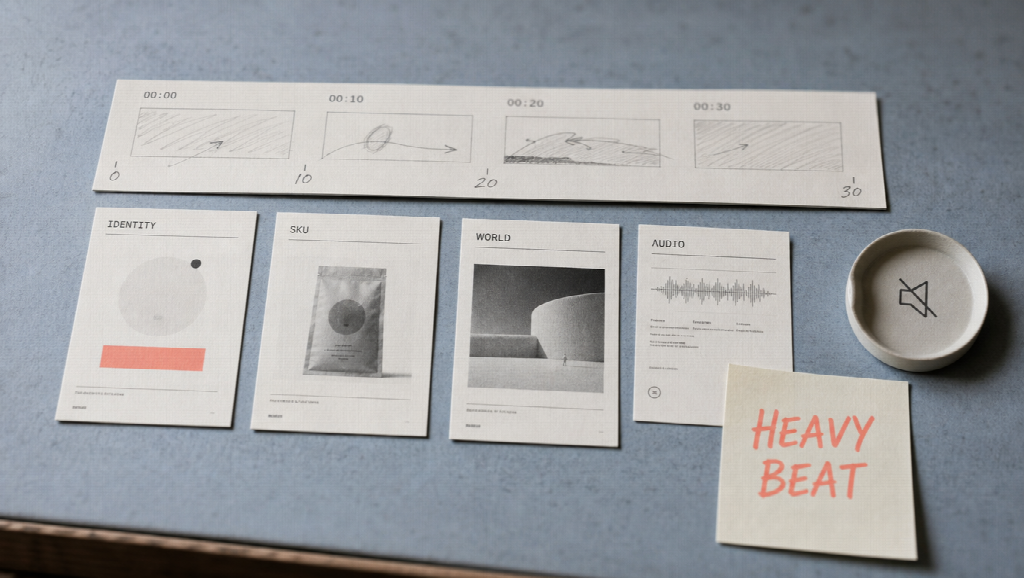
- pack references by role (identity, product, world, audio)
- write timed blocks inside the prompt
- preview continuity, then revise the failing range
Keep short punch inserts on lighter tools if you want. Do not burn a 30-second pass on a three-second emoji reaction.
Thursday — assemble, caption, QA
Return approved takes to the episode project. Check:
- same lead face and wardrobe language
- readable product labels where promised
- sound that matches the picture
- safe, brand-clean content
Friday — schedule and template the wins
Save the brief templates that worked. Retire the ones that caused three rerolls. Consistency is a production asset.
Who benefits most
Social marketers running TikTok / Reels / Shorts calendars with mixed story and offer content.
Faceless or low-crew channels that need characters and worlds without a camera team.
Ecommerce brands that want episodic storytelling plus real product spots from the same operating rhythm.
Small agencies packaging “series + ads” retainers without hiring a full post bay for every client.
Pros and trade-offs
Pros
- Clear ownership: structure vs long-beat generation
- Fewer continuity surprises across a month of posts
- Better credit discipline (render after boards and locks)
- Easier handoff between strategist, writer, and operator
Trade-offs
- dual-surface workflow needs a short SOP
- weak briefs still waste long generations
- serialized drama and product ads need different success metrics
Getting started this week
- Pick one series concept and one product claim.
- Build the episode skeleton in Drama Studio.
- Generate only the heaviest beat in Seedance 2.5.
- Publish one episode cut and one ad cut.
- Write a one-page SOP so next week is copy-paste, not reinvention.
Final thoughts
Streamlining video production is not about finding a magic “faceless” button. It is about stopping tool soup.
Use Drama Studio when the product is a serial story with memory. Use Seedance 2.5 when the product is a longer, reference-locked beat that has to hold for half a minute. Run them on the same weekly loop, measure on-time publishing and continuity — not how many random clips you generated before lunch.
That is how marketers and creators turn AI video from a demo habit into a production system.

Rajat Garg
Rajat is a digital marketing specialist with more than 8 years of experience. At SocialAppsHQ he manages social media campaigns for businesses worldwide and shares practical, tested marketing guidance through the blog.